Posts

performance review I guesss

Image
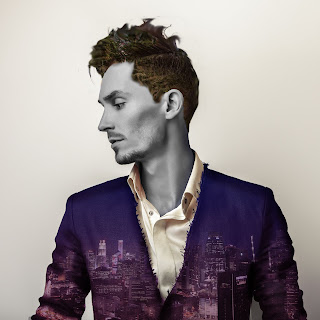
alright so I'm supposed to show like two projects and review them and stuff. if you can't tell, I'm VERY done right now, I'm exhausted. whatever. here we go. so as you can see, you have already seen this. it's Julia and Jared. yippee. the first one was a popart project, and the other one was like,, something with Photoshop 101. both of them didn't take very long. how long did it take? julia took like... a week, and jared took two days. you can see which one I liked better, clearly. any issues? I didn't have any problems with Julia, she was easy. jared, however. his hair was so hard!!! I relied heavily on effects to make it look at least semi decent. good critique? I didn't get a lot of critique. or at least... useful ones. I'm sorry, but like?? criticizing the color pallet isn't really critique, Helen (she doesn't exist it's a white girl insult). what did you learn? I mostly learned how to use the Wacom, it was pretty d...

my own prints!

Image
So I made my own prints, hooray! they're at my home at the moment, and I'm giving one to Emily, and another to my mom, for Christmas. I made these using the following steps: converting the press in photoshop creating the watercolor cutting the printed press gluing it on with mod podge, a thick layer letting it dry using wet fingers, rubbing off the excess paper I pretty much struggled little to none, this was incredible easy. I'd love to do this again!

Printing

Image
printing has been around since medieval times, thanks to the Gutternberg Printing press. If it weren't for printing, we wouldn't have lutheranism, books, or modern pop art drawings. Today, artist use printing as a type of media. There are three main types: Relief, Lithography, and Intaligo. R E L I E F- cutting into wood to make a stamp --------------- 1. coat wood cut in washed down India ink 2. Transfer the drawing via a carbon transfer or other methods 3. either use white line* or black line** composition to make the "stamp.     *white line is taking away black     **Black line is adding black 4. roll ink over the stamp 5. run it through the press 6. whoop there it is L I T H O G R A P H Y- drawing onto a specific stone, covering it in powder and greasing up boi ------------------------------ 1. draw a picture onto the stone 2. cover in talc or rosin. or both, your choice man. 3. rub the excess off 4. coat in Gum Arabic 5. apply ...

*~P A N O R A M A ~*

Image
6:35 AM.   A rainy Monday morning.   You sigh, the weight of your damp backpack being shrugged off of your shoulders as you set it on the other side of your seat on the bus. You lay your head onto the side window of the bus, but quickly pull it away as you feel your brain turn into a smoothie. You suppose you'll just crane your neck to check your surroundings.   The rain is almost ended, the golden yellow, peaches and blues peeking through the clouds. little rays of sunlight peek through as well, as if the hypothetical heaven itself was showing itself through the clouds. It could be a metaphor for depression, and recovery, or it could perhaps be a sign that it's going to be okay.   The world is at a standstill, very few cars are out. it's as if reality itself is altered, that you would be in a parallel universe. it's... peaceful. tranquil. that's all folks, this is a panorama project I did. this was taken with ten sunset photos I took onto the bus, or...

popart, featuring Boolia

Image
OH WOW. OH WOW. O H W O W. I loved doing this!!! wow!!!! This is my friend Julia, and she was a model for my popart project. I really wanted to incorporate the trees, and her hair into the design and to make it really uniform, so I found a color palette online. Our class began with going out to the courtyard and taking photos. Out of all of the many we took, this one was by far my favorite. I uploaded it into photoshop, grabbed a tablet and began my work. I decided on this green color scheme. Not only was it out of my comfort zone, but it provided a diverse amount of contrast I could have used in the piece. Thanks to multiply layers and adjustments, I could easily make the contrast even more prominent. To further the detail on shading, I used an inner shadow and outer glow setting. I also used a painterly blender brush, in order to give this some texture. I also used a screen tone to give it that pop art look. overall, I had a blast, and I want to do this so much more oft...

Jared, the Photoshop guy

Image
this was pretty easy, I must confess. I already had a general idea of what I wanted to do, and it all started with Singapore. Or.. a photo of Singapore. Meet Jared! I used a black and white color filter on his skin, I used a mask tool to get the trees onto his hair. I used blending layers on the suit, and color gradients on the suit as well to get that color. to amplify the shading, I placed a bevel and emboss layer as well. overall, I had to add a second layer of contrast, to make everything stand apart. the hair, generally, didn't turn out like I wanted it to. but the rest of it? it was exactly how. I wanted it to be. I'm actually really proud of this.

exploring photoshop, PhotoshopSurgeon is quaking

Image
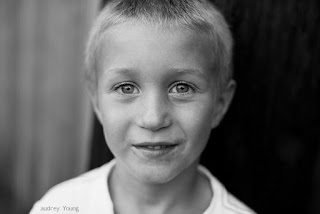
   Oh my god I think this is the day I perish.    Okay so like, we're learning how to do photoshop on photoshop. Like... moving things around and erasing tags and acne and things I wish I could do in real life. anyway if you want some examples, here's a few:    This is Dylan! He had a bunch of dirt and blemishes on his face before the spot healing tool pulled up like me at a Taco Bell. now, he's an airbrushed little youth. What a legend. Coming for my brand.    Thanks to content aware fill, the wall is flawless!!    Thanks to the patch tool, this dude doesn't have to worry about a political shirt at his daughter's... Why did they take this picture..?    This was the hardest one, this one I had to use so many of my pervious skills to combine this into one big crock pot. I'm pretty sure I'm traumatized after that.    I learned a lot from the photoshop tutorials. I learned that some people shouldn't ma...